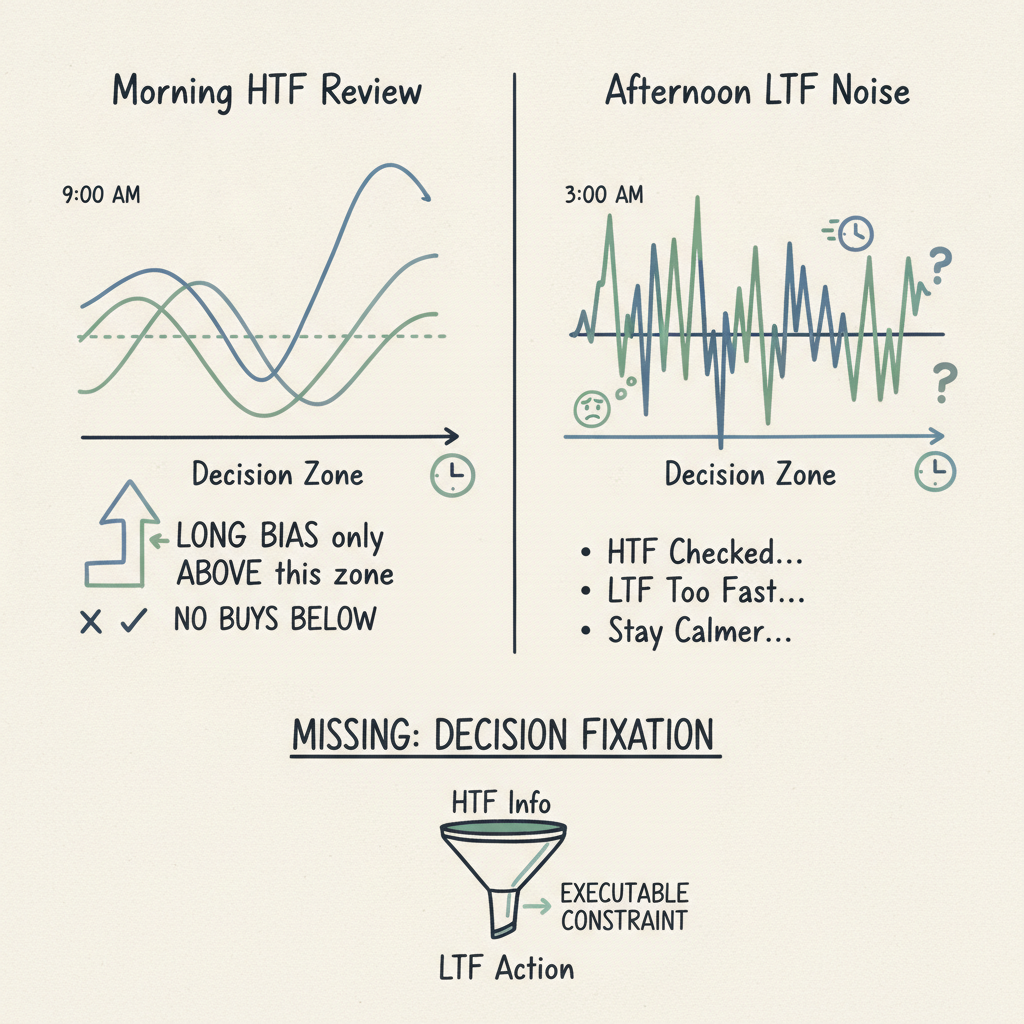
Why HTF checks still fail in live trading: your review must end as a decision line, not just information
If HTF reviews keep failing under LTF noise, the issue is often not analysis quality but missing decision fixation. This post explains how to convert HTF checks into executable constraints.
This happens in live trading all the time.
In the morning, you check higher timeframes and clearly define your day: “Long bias only above this zone.” Then intraday 5m volatility kicks in, your original framing fades, and by evening review you say the same thing again:
- “I did check HTF…”
- “LTF moved too fast…”
- “I should stay calmer next time…” The key issue is usually not calmness. In many cases, it is format. You reviewed HTF, but that review stayed as information and never got fixed as a decision.
1) Why HTF reviews still collapse: the output was not translated into execution language
The point of MTF is not seeing more charts. It is assigning different questions to different scales.
- HTF question: “What is today’s scene?” and “Where should I not act?”
- LTF question: “Is execution valid now?” and “Where is invalidation?” The common failure is stopping at “I checked.” That is not enough. You need to leave a decision statement.
For example:
- weak note: “4H resistance nearby”
- actionable note: “4H resistance nearby → no breakout chase longs / only pullback-confirmed longs allowed” They look similar, but behaviorally they are not. The first is data. The second is a rule. In live markets, consistency depends less on data volume and more on rule clarity.
2) LTF is not the villain; it often gets too much authority
Many traders start by using LTF for timing, then gradually let LTF decide direction too. At that point, HTF becomes background wallpaper.
A common loop:
- Define an HTF hypothesis.
- Observe a strong LTF impulse.
- Rewrite the HTF hypothesis immediately.
- Backfill HTF reasons after the rewrite. It feels adaptive, but it moves the decision baseline every hour. Once baseline keeps moving, reviews stop compounding and mistakes return under new names.
The solution is not suppressing LTF. It is restoring LTF to its original role.
- HTF: define scene + forbidden/allowed zones
- LTF: only validate execution inside HTF-approved zones When this boundary is clear, LTF noise hurts less because your “already-defined constraints” stay primary.
3) Minimal template to leave HTF as a decision, not memory
You do not need a complex framework. Three lines are enough:
Bias: priority direction vs non-priority direction
Context: allowed zone vs forbidden zone
Trigger rule: 1–2 execution conditions + 1 invalidation point Example:
Bias: upside priority; downside only on failed reclaim
Context: longs allowed above 4H mid-support; no resistance-front chase
Trigger rule: enter only after 15m structure reset + volume confirmation; invalidate below prior swing low This shifts your live question from “Does this candle look strong?” to “Did this pass my rule set?” That one switch reduces a lot of unnecessary flips.
4) Why this matters more in web-based trading environments
Web workflows naturally fragment attention: tabs, alerts, fills, and news all compete in parallel. In that setting, many failures are not about analysis skill—they are about decision retention cost.
If HTF checks live only in memory, they decay quickly. If they are externalized as explicit decision lines, you can re-anchor under pressure.
In trading, edge is often less about seeing more signals and more about losing less of the judgment you already built. 1k_scanner is built around that idea: a Rust+egui trading scanning app designed to preserve the Bias→Context→Trigger flow across multi-market, multi-timeframe execution.
Related content
HTF is the scene, LTF is the timing: why MTF gets confusing the moment questions mix
When the trigger was right but the trade was wrong — what breaks when Bias → Context → Trigger flips
How Four TA Legends Read MTF: Why Higher-Frame Direction Comes First
How Wyckoff actually uses multi-timeframe thinking: Phase up top, execution down below
Before You Enter, Check 3 Things — Level / Bias / Trigger (with 1k_scanner)
HTF is the scene, LTF is the timing: why MTF gets confusing the moment questions mix
HTF is the scene, LTF is the timing: why MTF gets confusing the moment questions mix
Recurring MTF confusion usually starts not from a lack of signals, but from mixing roles. A structural look at HTF/LTF separation and the Bias→Context→Trigger order.
This scene shows up in real trading more often than people admit.
- On the 4H chart you already had a sense that you’re near an important level—“don’t force it here.”
- Then a single sharp move prints on the 5‑minute.
- And that one candle suddenly feels like it rewrote the entire higher‑timeframe story. So you start bouncing between charts. Check the 1H, return to the 5m, glance at alerts, open the execution panel… And the most common feeling that appears is: “I have no idea what’s going on.”
At that point, many people define the problem like this:
- “I’m confused because I don’t have enough signals.”
- “I should add more indicators.” But in practice it’s often the opposite. MTF becomes confusing not because you lack signals, but because your questions are mixing.
The most common MTF failure mode: asking two different questions on one screen
The point of multi‑timeframe is not “look at more.” It’s to separate questions.
Yet in real time, one LTF move makes you ask both at once:
- “Did direction change?” (a higher‑timeframe question)
- “Should I act right now?” (a lower‑timeframe question) These two questions carry different responsibility. When you ask them on the same candle, inside the same emotion, their answers start contradicting.
That contradiction is what you experience as “confusion.”
HTF vs LTF: different roles means different meanings when something fails
MTF gets messier when you treat each timeframe as a machine that outputs “the right answer.” It gets simpler when you treat them as roles.
- HTF (higher timeframe) answers: “What scene is the market in?”where are the constraints (walls)where is there room (space)is my directional bias currently natural under structure
- LTF (lower timeframe) answers: “Inside that scene, what triggered action?”what timing cue appearedwhen execution became easier (or harder) Here’s the key difference. An LTF trigger failing does not automatically mean the HTF scene changed. And when the HTF scene changes while you only watch LTF triggers, you keep repeating the “late realization” loop.
So the problem may not be signal quality. It may be role separation breaking down.
Structural limits of web trading tools: data stays, but decisions disappear
Web charts are fast and convenient. But many web workflows are structurally good at rendering “what’s on the screen now,” and weak at preserving “what you already decided” (context).
When you switch tabs or change market/timeframe, what you lose is not candles—it’s your internal state.
- Why was I leaning this way?
- What scene did I decide I was in?
- What assumptions should survive even if this trigger fails? If those decisions are not visibly carried forward, thinking gravitates toward what is most salient: LTF speed, alerts, fills. And then the brain retrofits an HTF explanation afterward.
The outcome is familiar:
- execution is fast, interpretation is late
- failures get summarized as “the signal was wrong”
- next time you hunt for more signals But confusion doesn’t shrink.
Bias → Context → Trigger: not a winning formula, but a device for keeping order
What reduces confusion is not a magic method. It’s an order that prevents you from forgetting what you decided first.
A useful lens here is Bias → Context → Trigger.
- Bias (directional assumption)
- Which side currently feels more natural to me?
- Does that assumption conflict with HTF constraints (levels/structure)?
- Context (scene / zone)
- Is this a “space is opening” scene, or a “hitting a wall” scene?
- Can I explain “why now” without borrowing the trigger as my explanation?
- Trigger (execution cue)
- Is this cue trying to call direction, or only offering timing?
- If this trigger fails, do Bias/Context still stand? The moment this order collapses, MTF becomes confusing. And it collapses faster under fatigue. Fatigue tends to shrink Bias and Context—and inflate Trigger.
So on “confusing days,” the problem is often not missing information. It’s that thinking started at Trigger.
The question everything reduces to: “What got decided first?”
In review, before you add more signals, it can help to ask:
- Did I actually change Bias, or did I react to a Trigger?
- Did I look at LTF while keeping the HTF scene, or did I attach the scene afterward?
- Is my tool supporting my thinking order—or breaking it? When you can answer those, “why trading keeps feeling confusing” starts to look less like emotion and more like structure.
1k_scanner is not a document scanner—it’s a Rust + egui multi‑market, multi‑timeframe trading scanning app. Instead of listing signals, it focuses on reducing switching costs so the Bias→Context→Trigger order is easier to keep on screen.
Related content
When the trigger was right but the trade was wrong — what breaks when Bias → Context → Trigger flips
How Four TA Legends Read MTF: Why Higher-Frame Direction Comes First
How Wyckoff actually uses multi-timeframe thinking: Phase up top, execution down below
Before You Enter, Check 3 Things — Level / Bias / Trigger (with 1k_scanner)
Avoid Countertrend Traps with Multi-Timeframe Consensus — a 3-minute routine with 1k_scanner
When the trigger was right but the trade was wrong — what breaks when Bias → Context → Trigger flips
When the trigger was right but the trade was wrong — what breaks when Bias → Context → Trigger flips
Repeated multi-timeframe confusion is often not a lack of signals but a breakdown in thinking order. Separating HTF vs LTF roles makes the chaos visible.
You see a clean break on a 5‑minute chart, you take it… and ten minutes later price snaps back as if nothing happened.
The thoughts that follow are usually the same:
- “Did I read the signal wrong?”
- “What was that breakout, then?”
- “Why do I keep being wrong exactly when it looked the most right?” A lot of the time, this isn’t about lacking a strategy. It’s about something more basic: the order of your thinking got scrambled. Multi‑timeframe (MTF) makes that scramble easier.
MTF confusion is often role confusion, not information overload
MTF feels hard because there’s “too much to look at.” That’s true. But the bigger issue in practice is that we start asking the wrong timeframe to do the wrong job.
It looks like this:
- A small shift on the LTF becomes “the higher timeframe trend just flipped.”
- You react to the urgency of an LTF trigger before checking whether the HTF scene supports it.
- Later, you notice you entered right into an HTF level/structure… and you conclude “I missed a signal.” Often, the trigger wasn’t “wrong.” It was simply standing on a stage that didn’t exist.
Why structure / context / sequence beats more signals
Signals tend to describe “right now.” Structure and context describe “what scene we’re in.”
If you process both on the same layer, the chart will always feel like it’s changing its face. A breakout can look identical on the surface, but its meaning changes dramatically depending on whether:
- the HTF has opened space, or
- the HTF is pressing price into a wall. That’s why collecting more signals can increase confusion. Signals keep firing, and each one pressures your brain to conclude immediately.
What MTF needs isn’t a bigger catalog of triggers. It needs interpretation with an order.
HTF vs LTF isn’t a debate about “who’s right” — it’s division of labor
Conflict appears when you ask the same question (“what’s the direction?”) on both 5m and 4h. Different answers are normal.
Try a clean division of labor:
- HTF (higher TF) job:What direction is the market naturally permitting (or clearly forbidding)?Where are the key levels/structures, and what constraints do they impose?Is there actual “room” to move, or has the move already been explained?
- LTF (lower TF) job:Within HTF constraints, when is the best time to act?When does execution become simpler and risk naturally smaller? In this framing, LTF isn’t trying to “beat” HTF. LTF becomes meaningful inside the stage HTF sets.
Why web-based trading workflows structurally amplify confusion (and fatigue)
There’s also a very practical layer: many workflows are web-based.
This isn’t a moral judgment about web tools. It’s a structural observation:
- As tabs and charts multiply, context lives in your memory more than on the screen.
- More alerts increases the priority of “react now.”
- Scanning multiple markets across multiple timeframes turns into repetitive manual motion. Repetition becomes fatigue, and fatigue simplifies thinking.
Under fatigue, decision-making often converges to:
- reduce context (HTF)
- enlarge triggers (LTF)
- explain losses as “the signal failed” So the confusion is not only personal. It’s also environmental (tooling + fatigue).
A thinking flow: Bias → Context → Trigger
Here’s a useful lens—not as a winning formula, but as a way to notice what you’re doing.
Bias → Context → Trigger
- Bias (your lean / assumption):What am I currently leaning toward?Does this lean conflict with HTF constraints?
- Context (the scene):Is this a continuation scene, or a “hitting a level” scene?Is there real room left, or are we late to the story?
- Trigger (the action cue):Is this signal telling me timing, or is it seducing me into calling direction?If this trigger fails, does my understanding of the scene still stand? This sequence matters because most real-world confusion starts when we begin at Trigger. Triggers are fast, strong, and they move your hand. But that strength also steals your sequence.
Closing
On the days trading feels especially confusing, it’s often not because the market became “hard.” It’s because the order of thinking collapsed.
What helps is not more signals, but a small design that separates HTF vs LTF roles and keeps the flow Bias→Context→Trigger.
If maintaining that flow manually feels heavy, 1k_scanner is not a document scanner—it’s a Rust + egui multi‑market, multi‑timeframe trading scanning app built to help you see context first.
Related content
Before You Enter, Check 3 Things — Level / Bias / Trigger (with 1k_scanner)
A scanner that helps you decide where to look: what 1K Scanner actually is
Where Do You Trade: Structural Search
Why MTF makes structure visible (and noise quieter)
Avoid Countertrend Traps with Multi-Timeframe Consensus — a 3-minute routine with 1k_scanner
Before You Enter, Check 3 Things — Level / Bias / Trigger (with 1k_scanner)
Before You Enter, Check 3 Things — Level / Bias / Trigger (with 1k_scanner)
A practical pre-trade checklist: fix Level, Bias, and Trigger before you click. Less noise, fewer repeated mistakes.
In trading, the most expensive mistake is not a single bad entry. It is repeating the same kind of bad entry over and over.
One of the simplest ways to improve entry quality is not to watch charts longer. It is to fix three things before you enter:
- Level (where a reaction should happen)
- Bias (which side the higher timeframe favors)
- Trigger (what event must happen on the lower timeframe) Please feel free to copy/paste the checklist below.
The 3-check pre-trade checklist (copy/paste)
Level: Are you near a meaningful area (prev high/low, pivots/VWAP, supply/demand zone)?
Bias: Is the higher timeframe (e.g., 1h/4h) aligned with your idea (or is the pullback thesis clearly defined)?
Trigger: Did a real event occur on the lower timeframe (e.g., 5m/15m structure shift, breakout, channel/line break)? Decision rule:
No Level / no Bias → observe only
Trigger only (lower TF flashing) → skip (often a trap)
All three aligned → keep as a candidate
What 1k_scanner does for you here
This routine is not hard because the checklist is complex. It is hard because there are too many symbols, markets, and timeframes to scan manually.
1k_scanner does not invent an entry strategy for you. Instead, it helps you do this quickly:
- Compress the candidate set across many symbols/venues
- Layer timeframes so Bias is visible (MTF alignment)
- Reduce “signal without structure,” so Trigger becomes meaningful
Exits are also a 3-check problem
Invalidation matters. If you define exits before entries, your stop becomes a rule instead of a feeling.
Examples:
- Level invalidation: failure at a key level and re-entry into the prior range
- Bias invalidation: higher timeframe bias flips
- Trigger invalidation: lower timeframe structure breaks
Closing
Instead of staring at charts longer, please try fixing Level / Bias / Trigger before you enter. When those three align, unnecessary entries drop dramatically.
Related content
Avoid Countertrend Traps with Multi-Timeframe Consensus — a 3-minute routine with 1k_scanner
A scanner that helps you decide where to look: what 1K Scanner actually is
Where Do You Trade: Structural Search
Why MTF makes structure visible (and noise quieter)
Avoid Countertrend Traps with Multi-Timeframe Consensus — a 3-minute routine with 1k_scanner
Avoid Countertrend Traps with Multi-Timeframe Consensus — a 3-minute routine with 1k_scanner
A simple multi-timeframe consensus checklist that filters out the ‘lower-TF looks perfect’ traps and speeds up decisions.
Sometimes the setup looks perfect on 1m/5m… and then you get slammed instantly.
That’s usually not “bad execution”. It’s timeframe mismatch.
- Lower TF (1m/5m): creates an entry trigger
- Higher TF (1h/4h): decides the direction, levels, and available space If only the lower TF is flashing, it’s often a trap. If higher TFs open the path, execution becomes much simpler.
What I mean by “consensus” (one-line definition)
Consensus = multiple timeframes telling the same story.
A practical trio:
- 15m: a trigger appears (structure shift / breakout / channel break)
- 1h: the bias is aligned (trend holds, or a clean pullback context)
- 4h: you’re near a meaningful level and there’s room to move When these agree, it stops being “vibes”. It becomes a probability game.
The 3-minute routine (Observe → Checklist → Execute/Manage)
1) Observe (1 min): reduce the candidate set first
Most losses don’t come from “too many charts”. They come from seeing just enough to keep clicking.
1k_scanner is not an entry system. It’s a target selector: it helps you find where your entry system is worth applying.
2) Checklist (1 min): pass 3 checks, then you’re allowed to trade
Copy/paste this:
Checklist (copy/paste)
4h: Are we near a major level (prev high/low, VWAP/pivots, supply/demand zone)?
1h: Is the trend/bias intact (or is the pullback context clean)?
15m: Do we have a real trigger (structure shift, breakout, channel/line break)? Decision rule:
Lower TF only → pass
Higher TF opens the path → keep as a candidate
3) Execute (30 sec): write invalidation first
The fastest way to trade cleaner is to define exits before entries.
Examples:
- 15m invalidation: the swing structure breaks → OUT
- 1h invalidation: pullback thesis fails / flips → OUT
- 4h invalidation: rejection at key level fails → OUT Your stop isn’t a feeling. It’s a rule.
4) Manage (30 sec): consensus breaks → you leave
That’s it. If consensus breaks, you’re done.
Closing
The goal isn’t to stare at charts longer. It’s to decide faster with fewer regrets.
Multi-timeframe consensus is a simple filter. And 1k_scanner turns that filter from “manual scanning” into a system.
Related content
A scanner that helps you decide where to look: what 1K Scanner actually is
Where Do You Trade: Structural Search
Why MTF makes structure visible (and noise quieter)
Why the Same Pattern Can End Differently: A 3-Step Context Routine
Why the Same Pattern Can End Differently: A 3-Step Context Routine
The same chart pattern can imply different outcomes when context changes. This post gives a practical scan-focused routine from broad view to focused check and note-taking.
You can see the same shape many times and still read it differently. The result changes because context changes: where the chart sits, how the larger flow is behaving, and whether the pullback is holding structure.
This post does not present a new entry method. It focuses on what to review first and how to decide candidate priority from a workflow perspective.
1) Scan wide first: why dense mode should come first
1-1) What to do right after launch
After opening the app, check the loaded workspace first. A stable routine starts with this order:
Ctrl/Cmd + 7: switch to dense grid and scan a wider candidate field.Ctrl/Cmd + 8: switch to expanded grid to narrow focus.Space: expand the current chart for deeper verification.
1-2) Column and row logic
A common confusion is to read rows and columns in the wrong orientation. In practice, the layout works as column = symbol, row = timeframe. So one column lets you read one symbol’s flow across multiple horizons from top to bottom.
When the same pattern is judged differently, it is often because the column-level comparison is inconsistent. Start by comparing candidates column by column.
2) For the same pattern, the useful lens is context, not a truth label
Use the same two references only as lenses:
- EMA/NRZ are not entry switches.
- EMA (persistence view): a first pass to estimate whether momentum can be sustained.
- NRZ: a context check on whether pullback behavior still keeps structure. The practical point is this: they help you rank observation candidates, not replace your decision.
2-1) A context checklist when outcome differs
Even if a chart shape is similar, reading changes when one of these differs:
- Does the candidate match the broader context in that same column?
- Is structure still being held after pullback?
- Is this candidate “watch now” or “defer” in your own sequence? This prevents emotional selection and keeps the workflow objective.
3) The practical meaning of consensus cues (border color)
Many users treat consensus as a direct action trigger. In this context, it is better understood as an attention allocation cue.
- When several signals point in the same direction, the border tends to show a clear directional frame (long/short emphasis) and becomes a stronger focus candidate.
- If signals are mixed, neutral, or noisy, the cue is often low-emphasis, so you usually move it to “wait” or “hold-off.” When consensus appears, the right action is still not immediate entry. It is candidate filtering plus next-step verification.
4) Routine for same-pattern cases: scan → focus → record
4-1) Scan phase (about 2 minutes)
- Start with
Ctrl/Cmd + 7to widen the candidate view. - Confirm the same symbol is aligned by column.
- Before deep zoom, compare timeframe continuity in that column first.
4-2) Focus phase (1~2 minutes)
- Read top-to-bottom within the candidate column.
- Keep only likely candidates.
- Use
Ctrl/Cmd + 8to narrow the board and preserve attention.
4-3) Record phase (30 seconds)
Do not overfit a decision in one glance. Record it.
V: toggle check-note on the current chart.N: open the CheckNote section and review recent candidate logic. A short one-line note for why you skipped or kept a candidate is enough to preserve continuity into the next session.
5) Fix your workflow with templates
If you recreate the setup manually every time, workflow drift increases. Keep it stable through templates.
- Set
Grid Size,Timeframes per row, andExchange, then run Generate Template (by size) - Save with F12
- Load later with Ctrl/Cmd + L Having separate templates for scan mode and focus mode reduces startup noise before markets move.
Closing
The same pattern is not the same outcome. For stable execution, use the 3-step loop: scan wide, focus deep, and record decisions.
Remember: 1k_scanner is not a document scanner. It is a Rust+egui-based multi-market, multi-timeframe trading scanning app.
Related content
Drop the mouse: keyboard workflow is how you actually scan 1,000+ chart views
When the trigger was right but the trade was wrong — what breaks when Bias → Context → Trigger flips
Before You Enter, Check 3 Things — Level / Bias / Trigger (with 1k_scanner)
Avoid Countertrend Traps with Multi-Timeframe Consensus — a 3-minute routine with 1k_scanner
A scanner that helps you decide where to look: what 1K Scanner actually is
Where Do You Trade: Structural Search
Where Do You Trade: Structural Search
A practical loop: define the market scene first, then execute only when the trigger fits.
Structural search is not an indicator strategy. It is a way to decide where your attention should stay.
When the chart is noisy, most people do this:
- open many screens
- read many signals
- collect more “record”
- still feel uncertain That happens because we confuse more data with better decisions.
Why this still matters
In trading, uncertainty disappears when constraints are clear. Not when information is endless.
1) Define the market scene first
Write one sentence before any chart hunting:
- Is the market in expansion or compression?
- Which level is currently controlling price?
- Is one side clearly pressing, or are both sides still fighting? If you cannot write this in one sentence, everything that follows is reactive.
2) Separate structure from trigger
Structure layer: What directions are allowed by higher-level context?
Trigger layer: Which current-price condition permits execution? This is a two-layer filter:
structure decides validity
trigger decides timing Only when both layers align do you execute.
3) Treat lower timeframes as record, not authority
Lower timeframes are useful for urgency, but urgency alone is not proof. A strong local move is not enough if the structure is wrong.
Copy-ready workflow
Before action, write two lines:
- Current scene: “Price is compressing near X, move above Y invalidates this structure.”
- Trigger condition: “Execute only when trigger confirms the scene and risk is defined.” If this takes longer than 20 seconds, you are still in collecting mode. That is the main source of noise fatigue.
Anti-noise rule
- Do not look for the best candle first.
- Confirm scene and constraints before urgency.
- Keep trigger narrow and explicit.
- If a trigger appears but scene broke first, re-check the scene. When repeated, this changes the game: price can stay noisy, but your rule set stays stable.
Closing
Structural search is not about being right more often. It is about reducing wrong reads.
Keep this sentence:
Structure decides where your decision is allowed. Trigger decides when you can execute.

Related content
Why MTF makes structure visible (and noise quieter)
Why MTF makes structure visible (and noise quieter)
Why MTF makes structure visible (and noise quieter)
MTF isn’t about seeing more. It’s about getting shaken less. Here’s the simple logic.
If you only look at one timeframe, random stuff starts to look like structure. That’s the noise trap.
MTF (multi-timeframe) flips that. It forces you to ask:
- Does the higher timeframe agree?
- Is the lower timeframe aligned? If they don’t line up, it’s not a real signal — just a blip. When they do line up, the signal survives.
Why “more timeframes” isn’t more noise
Counter‑intuitively, MTF is not about seeing more. It’s about getting less confused.
You’re not collecting extra data. You’re filtering.
- Higher TF gives direction (trend / bias)
- Lower TF shows execution (entries / exits)
- The middle TF keeps you honest
What stays important
When you stack timeframes, the only things that survive are the big obvious levels:
- Major swing highs/lows
- Clear break & retest zones
- Volume‑backed reactions Everything else fades. That’s the point.
In short
MTF doesn’t add complexity. It removes fake structure. If your signal only exists on one timeframe, it’s not a signal.
That’s why 1k scanner is built to see structure first — not just candles.